Work with lists and records
Search, filter, create, edit, export, and safely manage records across BSuit.
On this page
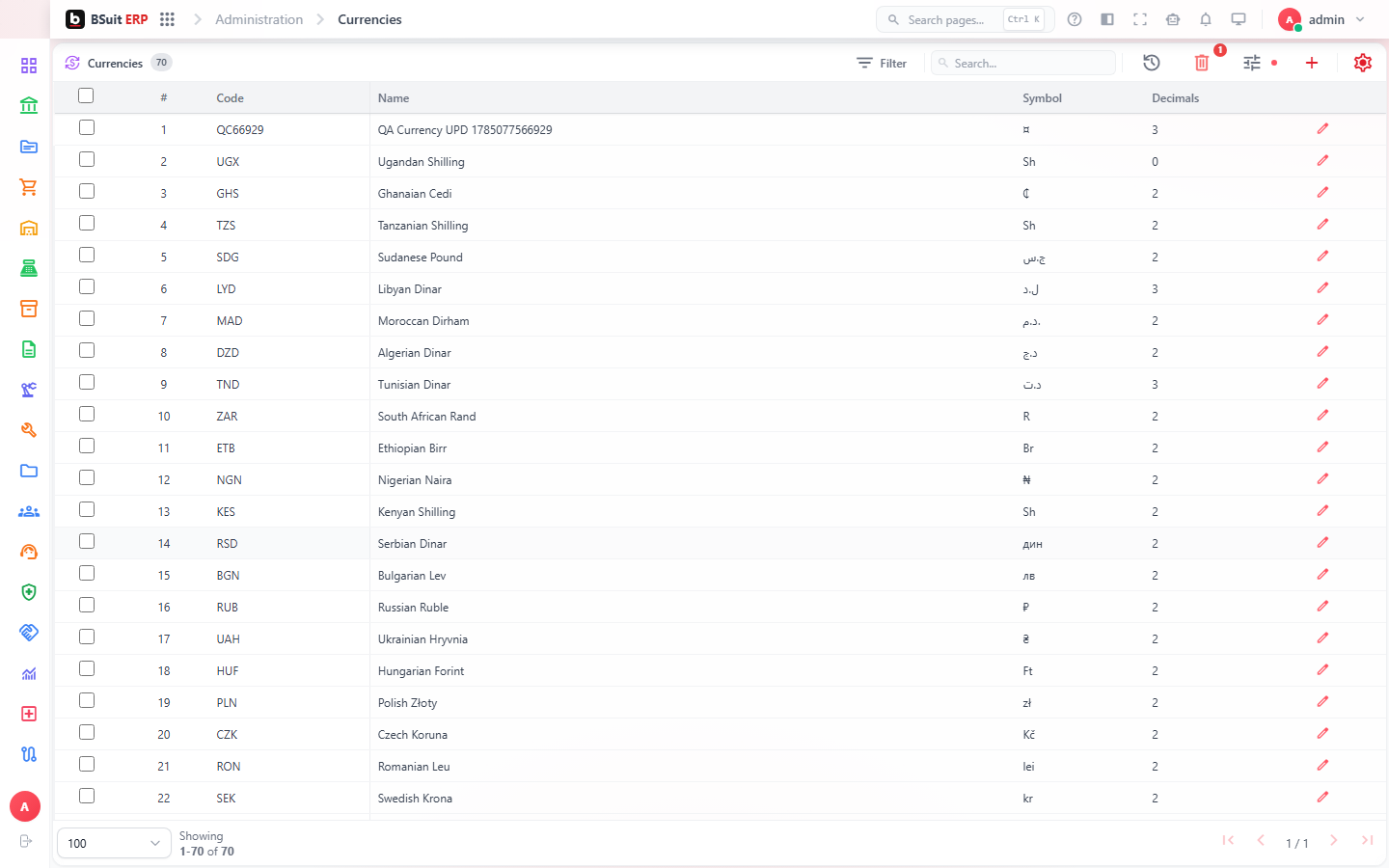
#Find records
- Use search for a quick text match.
- Open filters for field-specific criteria.
- Save a view when you will reuse the same columns and filters.
- Clear filters if expected records are missing.
#Create or edit
Required fields are marked. Field help, validation messages, and related-record selectors guide data entry. Save as draft when the business process supports it.
#Protected actions
Delete, post, approve, and bulk operations may require extra permission or confirmation. Posted business documents are normally corrected through reversal or cancellation rather than direct editing.
About this guide
- Status
- Partially reviewed
- Application
- BSuit ERP
- Audience
- All BSuit users
- Owner
- BSuit documentation team
- Reviewer
- Not yet reviewed
- Last verified
- Never
- Checked against
- Generated from source revision a36c7a086 on 2026-10-02
- Seen on a running system
- Not yet
- Help version
- 2026.0.0-preview
- Guide ID
erp:article/working-with-data/lists-and-records
Was this helpful?