Employees
Reference for Employees in Human Resources.
On this page
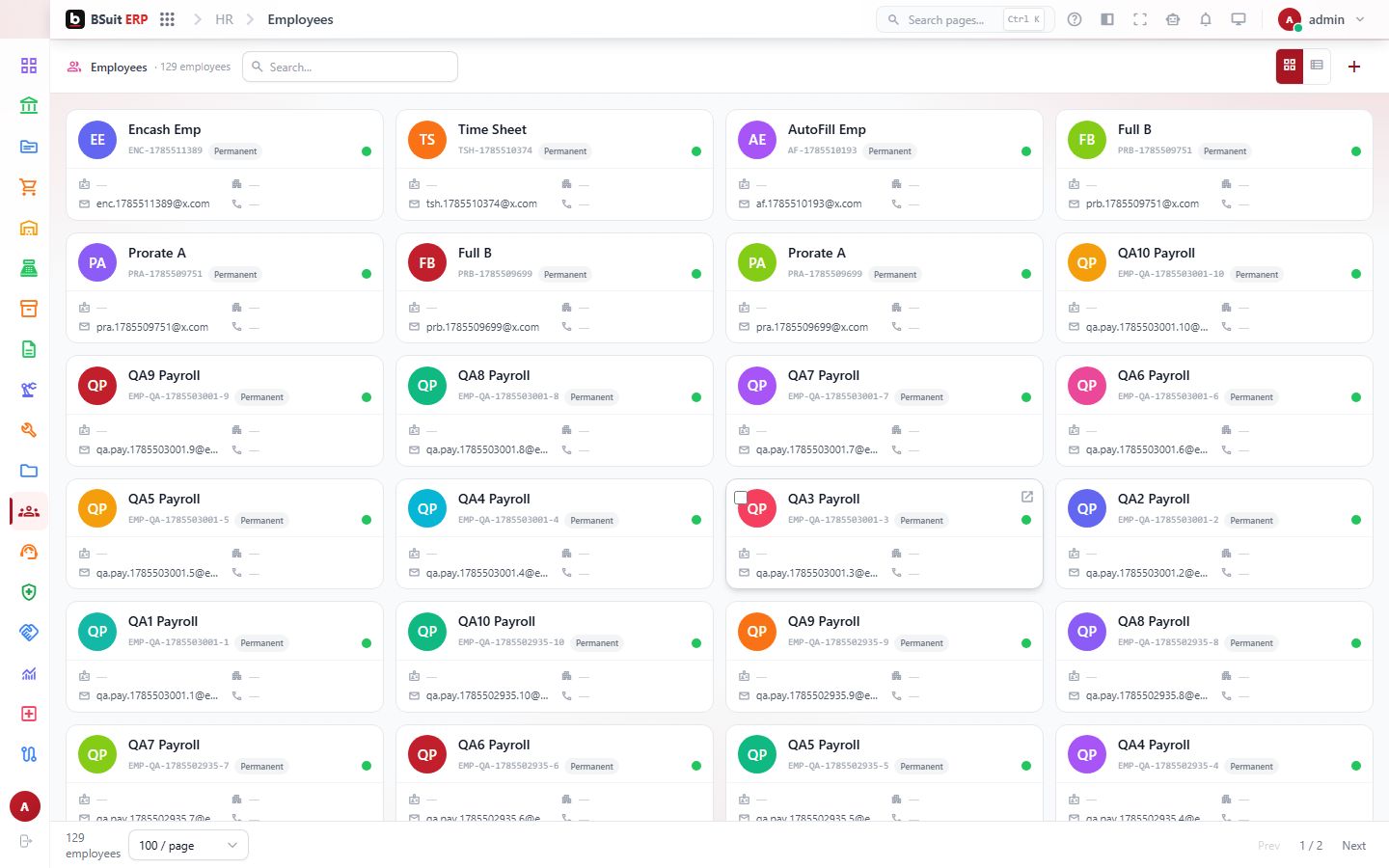
#About Employees
This is a working page: a list or workspace where you find and act on records in BSuit ERP (Human Resources). It is used by staff (internal users). What you can see and do depends on your role and permissions.
#How to open it
In BSuit ERP, open Human Resources and choose “Employees”, or go directly to the address /hr/employees.
#What you can do here
These controls are present in the page’s implementation. Whether you see a given one also depends on your permissions and on the data shown.
- Add new records — a form opens for the details.
- Change existing records.
- Delete records (you are asked to confirm).
- Bring records in from a file.
- Export what you see to a file.
- Attach or upload files.
- Search within the page.
- Filter the data shown.
- Sort by a column.
- Page through long lists.
- Work across tabs.
- Open dialogs or drawers for detail and confirmation.
- Some controls depend on your permissions.
#Fields
When you enter or change an employee, these fields are on the form. Required fields must be completed before you can save.
| Field | Type | Required | Details | Refers to |
|---|---|---|---|---|
| Employee Code | text | Yes | — | — |
| First Name | text | Yes | — | — |
| Last Name | text | Yes | — | — |
| No | — | — | ||
| Phone | text | No | — | — |
| Date Of Birth | date | No | — | — |
| Gender | select | No | One of: Male, male, Female, female, Other, other_gender. | — |
| Nationality | text | No | — | — |
| Marital Status | select | No | One of: Single, single, Married, married, Divorced, divorced, Widowed, widowed. | — |
| A+ | select | No | One of: A+, A-, B+, B-, AB+, AB-, O+, O-. | — |
| Address | textarea | No | — | — |
| City | text | No | — | — |
| State | text | No | — | — |
| Country | text | No | — | — |
| Pincode | text | No | — | — |
| Emergency Contact Name | text | No | — | — |
| Emergency Contact Phone | text | No | — | — |
| Designation | select | No | — | Chosen from a list loaded by the page |
| Department | select | No | — | Chosen from a list loaded by the page |
| Company | select | No | — | Chosen from a list loaded by the page |
| Date Of Joining | date | No | — | — |
| Employment Type | select | No | One of: Permanent, permanent, Contract, contract, Probation, probation, Intern, intern. | — |
| Shift | select | No | One of: Day, day, Night, night, Rotational, rotational. | — |
| Date Of Leaving | date | No | — | — |
| Leaving Reason | text | No | — | — |
| Is Active | checkbox | No | Default: true. | — |
| Sort Order | number | No | Default: 0. | — |
| Basic Salary | number | No | — | — |
| Salary Currency | select | No | — | Chosen from a list loaded by the page |
| Salary Structure | select | No | — | Chosen from a list loaded by the page |
| Bank Name | text | No | — | — |
| Bank Branch | text | No | — | — |
| Account Number | password | No | — | — |
| Ifsc Code | password | No | — | — |
| Pan Number | password | No | — | — |
| Aadhaar Number | password | No | — | — |
#Data stored for each record
The full list of 57 stored fields, including ones not shown on the form, is in the EmployeeEntity data reference.
#Where Employees is used as a reference
Records from this master are picked in these other forms, so changing or deleting one can affect them:
| Form | Field |
|---|---|
| Run Items | Employee |
| Advanced | Assigned To |
| Advanced | Requested By |
| Assets | Assigned Employee |
| Breakdown Reports | Reported By ID |
| Drivers | Employee ID |
| Inspection Records | Inspector ID |
| Rental Extensions | Approved By |
| Rental Returns | Received By |
| Vehicle Incidents | Reported By |
| Accruals | Employee id |
| Change Requests | Requester |
| Change Requests | Assigned Agent |
#Observed on a running system
On 2026-09-21 this page was opened in a browser as a test administrator. This is what was visible on screen. Your own view can differ with your role, data and settings.
| Button |
|---|
| Add (plus icon) |
| Demo 22815650 Demo 22819850 |
| Demo 22311449 Demo 22316049 |
| Demo 21511948 Demo 21516448 |
| Demo 21046547 Demo 21050647 |
| Demo 20569546 Demo 20574146 |
| Demo 20086945 Demo 20091145 |
| Demo 19620944 Demo 19625044 |
| Demo 19192843 Demo 19196343 |
| Demo 18777742 Demo 18781742 |
| Demo 18321041 Demo 18324241 |
| Demo 17927340 Demo 17932640 |
| Demo 17541239 Demo 17544539 |
| Demo 17144538 Demo 17147938 |
| Demo 16660437 Demo 16664037 |
| Demo 16238536 Demo 16244536 |
| Demo 15821935 Demo 15825435 |
| Demo 15402734 Demo 15406834 |
| Demo 14956333 Demo 14959933 |
| Demo 14544532 Demo 14547932 |
| Demo 14133931 Demo 14137331 |
| Demo 13710930 Demo 13714230 |
| Demo 13309829 Demo 13313129 |
| Demo 12902928 Demo 12906328 |
| Demo 12445727 Demo 12449227 |
#If something is missing or fails
- No data: confirm the company or context selected in the top bar, and any filters or date range in use.
- An action is hidden or disabled: it usually needs a permission your role does not have. Ask an administrator to check your effective access.
- An error message appears: note the message, the page address and what you were doing, and contact support with those details (never include passwords).
#About this guide
This guide was generated from the page’s implementation. It has not yet been reviewed by a person against a running system, so treat it as a reference for what the page contains rather than a complete procedure.
About this guide
- Status
- Partially reviewed
- Application
- BSuit ERP
- Audience
- Staff (internal users)
- Owner
- BSuit documentation team
- Reviewer
- Not yet reviewed
- Last verified
- Never
- Checked against
- Generated from source revision a36c7a086 on 2026-10-02
- Seen on a running system
- 2026-09-21
- Help version
- 2026.0.0-preview
- Guide ID
erp:/hr/employees